10 dbt Macros You'll Reuse in Every Project: A Demand Forecasting Tutorial with Prophet

16 minutes to read
Get free consultation

Introduction: Why DBT Macros Matter for Forecasting

Forecasting demand or sales is one of the most valuable skills a data team can deliver. The challenge is clear: most organizations lack dedicated data science resources to build these models from scratch.

You do not need a PhD in machine learning to produce reliable forecasts. By combining dbt macros with Facebook Prophet, you can create a repeatable, accessible forecasting pipeline that any SQL-proficient analyst can maintain.

In this tutorial, we walk through 10 essential dbt macros specifically designed for time series forecasting, then connect them to a Prophet model in Python. Our goal: help you build a forecasting workflow that you can copy, adapt, and reuse across every project.

At Stellans, we have battle-tested these macros across 50+ client implementations. Clients report 40% faster time-to-insight after implementing macro-based forecasting pipelines. This guide shares the exact approach we use.

Understanding Prophet and When to Use It

What Is Facebook Prophet?

Prophet is an open-source forecasting library developed by Meta (formerly Facebook). It is designed for business time series that exhibit strong seasonal patterns and trend changes. According to Prophet’s official documentation, the library provides “completely automated forecasts that can be tuned by hand by data scientists and analysts.”

Key features include:

When Prophet Is the Right Choice

Prophet excels in specific scenarios:

Use Case Why Prophet Works
Daily or weekly business metrics Built-in seasonality handling
Demand forecasting Robust to missing data points
Sales projections Handles multiple seasonal patterns
Non-stationary time series Automatic trend change-point detection

When to consider alternatives:

For most business forecasting needs, Prophet strikes the right balance between accuracy and accessibility.

Pulling and Preparing Data from Your Warehouse

SQL Queries for Time Series Extraction

Every Prophet model starts with clean, properly formatted data. The model requires exactly two columns: ds (datestamp) and y (numeric value to forecast).

Here is a standard SQL query for daily sales aggregation:

SELECT DATE(order_date) AS ds, SUM(order_amount) AS y FROM {{ ref('fct_orders') }} WHERE order_date >= DATEADD('year', -2, CURRENT_DATE) GROUP BY 1 ORDER BY 1
https://stellans.io/wp-content/uploads/2026/01/stellans2026-01-15T14_59_25.791Z.png

This query aggregates order amounts by day, giving Prophet the time series format it needs.

Ensuring Prophet-Compatible Format

Prophet is strict about its input requirements:

Where DBT Macros Fit In

Manually writing data preparation logic for every forecast is tedious and error-prone. DBT macros transform your workflow by letting you encapsulate common transformations into reusable functions. Instead of copying SQL across models, you call a macro once. The result: cleaner code, fewer bugs, and faster development cycles.

For teams establishing their analytics foundation, understanding dbt project structure conventions becomes essential before building your macro library.

10 Essential dbt Macros for Time Series Forecasting

These macros address the most common data preparation challenges we encounter in forecasting projects. Each one solves a specific problem you will face repeatedly.

Macro 1: Coalesce Null Values for Clean Time Series

Null values break forecasts. This macro provides a clean default:

{% macro coalesce_sql(column_name, default_value=0) %}
    COALESCE({{ column_name }}, {{ default_value }})
{% endmacro %}

Usage in a model:

SELECT
    ds,
    {{ coalesce_sql('y', 0) }} AS y
FROM {{ ref('raw_sales') }}

This ensures your time series has no gaps that would confuse Prophet.

Macro 2: Standardize Date Columns

Different source systems format dates differently. Standardize them:

{% macro standardize_date(column_name) %}
    DATE({{ column_name }})::DATE
{% endmacro %}

Prophet requires consistent date formatting. This macro ensures every date column meets that standard regardless of source.

Macro 3: Generate Lag Features

Lag features capture historical patterns. They answer: “What was the value 7 days ago?”

{% macro generate_lag_feature(column_name, lag_days, partition_by=None) %}
    LAG({{ column_name }}, {{ lag_days }}) OVER (
        {% if partition_by %}PARTITION BY {{ partition_by }}{% endif %}
        ORDER BY ds
    ) AS {{ column_name }}_{{ lag_days }}d_ago
{% endmacro %}

Usage:

SELECT
    ds,
    y,
    {{ generate_lag_feature('y', 7) }},
    {{ generate_lag_feature('y', 30) }}
FROM {{ ref('daily_sales') }}

Lag features help Prophet understand recent trends and can improve forecast accuracy significantly.

Macro 4: Calculate Rolling Averages

Rolling averages smooth out daily noise to reveal underlying trends:

{% macro rolling_average(column_name, window_days) %}
    AVG({{ column_name }}) OVER (
        ORDER BY ds
        ROWS BETWEEN {{ window_days - 1 }} PRECEDING AND CURRENT ROW
    ) AS {{ column_name }}_{{ window_days }}d_avg
{% endmacro %}

Business application: A 7-day rolling average of sales removes day-of-week effects. A 30-day average shows monthly trends without weekly fluctuations.

SELECT
    ds,
    y,
    {{ rolling_average('y', 7) }},
    {{ rolling_average('y', 30) }}
FROM {{ ref('daily_sales') }}

Macro 5: Flag Weekend and Holiday Dates

Weekends and holidays dramatically affect demand patterns:

{% macro is_weekend(date_column) %}
    CASE
        WHEN DAYOFWEEK({{ date_column }}) IN (0, 6) THEN TRUE
        ELSE FALSE
    END AS is_weekend
{% endmacro %}

Extended version with holiday support:

{% macro is_holiday(date_column, holiday_table) %}
    CASE
        WHEN {{ date_column }} IN (SELECT holiday_date FROM {{ holiday_table }})
        THEN TRUE
        ELSE FALSE
    END AS is_holiday
{% endmacro %}

Prophet can incorporate these flags as additional regressors, improving accuracy for businesses with strong weekend or holiday effects.

Macro 6: Cross-Database Current Timestamp

Different warehouses have different timestamp functions. This macro abstracts that complexity:

{% macro current_timestamp_sql() %}
    {% if target.type == 'snowflake' %}
        CURRENT_TIMESTAMP()
    {% elif target.type == 'bigquery' %}
        CURRENT_TIMESTAMP()
    {% elif target.type == 'databricks' %}
        CURRENT_TIMESTAMP()
    {% else %}
        NOW()
    {% endif %}
{% endmacro %}

Use case: Track when forecasts were generated for audit and versioning purposes.

Macro 7: Generate Surrogate Keys

Unique identifiers for forecast records enable proper tracking and comparison:

{% macro generate_forecast_key(forecast_date, model_version) %}
    {{ dbt_utils.generate_surrogate_key([forecast_date, model_version]) }}
{% endmacro %}

This leverages the dbt-utils package, which we recommend installing in every project.

Macro 8: Convert Units Safely (Cents to Dollars)

Financial data often arrives in cents. Convert it consistently:

{% macro cents_to_dollars(column_name, scale=2) %}
    ({{ column_name }} / 100.0)::NUMERIC(16, {{ scale }})
{% endmacro %}

Consistent unit conversion prevents the common error of forecasting in the wrong denomination.

Macro 9: Extract Date Parts

Seasonality features often require extracting date components:

{% macro extract_date_parts(date_column) %}
    EXTRACT(YEAR FROM {{ date_column }}) AS year,
    EXTRACT(MONTH FROM {{ date_column }}) AS month,
    EXTRACT(WEEK FROM {{ date_column }}) AS week_of_year,
    EXTRACT(DOW FROM {{ date_column }}) AS day_of_week
{% endmacro %}

These extracted parts enable feature engineering for seasonality analysis and can supplement Prophet’s built-in seasonality detection.

Macro 10: Audit Helper for Forecast Validation

Compare forecasted values against actuals once real data arrives:

{% macro forecast_accuracy_check(forecast_table, actual_table, date_column, value_column) %}
    SELECT
        f.{{ date_column }},
        f.predicted_value,
        a.{{ value_column }} AS actual_value,
        ABS(f.predicted_value - a.{{ value_column }}) AS absolute_error,
        ABS(f.predicted_value - a.{{ value_column }}) / NULLIF(a.{{ value_column }}, 0) * 100 AS percentage_error
    FROM {{ forecast_table }} f
    LEFT JOIN {{ actual_table }} a
        ON f.{{ date_column }} = a.{{ date_column }}
{% endmacro %}

This macro creates a validation dataset for ongoing forecast monitoring.

Quick Reference Table

Macro Purpose Forecasting Benefit
coalesce_sql Handle null values Prevents Prophet errors from missing data
standardize_date Consistent date formatting Ensures Prophet-compatible ds column
generate_lag_feature Historical lookback Captures recent trends
rolling_average Smooth noisy data Reveals underlying patterns
is_weekend / is_holiday Flag special dates Improves accuracy for seasonal businesses
current_timestamp_sql Cross-database timestamps Forecast versioning and auditing
generate_forecast_key Unique identifiers Track and compare forecast versions
cents_to_dollars Unit conversion Prevents denomination errors
extract_date_parts Seasonality features Supplements Prophet seasonality
forecast_accuracy_check Validation Ongoing model monitoring

Python Walkthrough: Training and Evaluating a Prophet Model

With your data prepared using dbt macros, the Python portion becomes straightforward.

Pulling Prepared Data into Python

Connect to your warehouse and load the prepared dataset:

import pandas as pd
from sqlalchemy import create_engine

# Connect to your warehouse (example for Snowflake)
engine = create_engine(
    'snowflake://user:password@account/database/schema'
)

# Load prepared data
query = """
SELECT ds, y 
FROM analytics.fct_daily_sales_prepared
WHERE ds >= '2024-01-01'
ORDER BY ds
"""

df = pd.read_sql(query, engine)
print(df.head())

The output should show your clean time series with ds and y columns ready for Prophet.

Training the Prophet Model

Prophet follows a simple fit-predict pattern similar to scikit-learn:

from prophet import Prophet

# Initialize model with custom settings
model = Prophet(
    seasonality_mode='multiplicative',  # For percentage-based seasonality
    changepoint_prior_scale=0.05,       # Controls trend flexibility
    yearly_seasonality=True,
    weekly_seasonality=True,
    daily_seasonality=False             # Usually False for daily aggregated data
)

# Fit the model
model.fit(df)

# Create future dates for forecasting
future = model.make_future_dataframe(periods=90)  # 90-day forecast

# Generate predictions
forecast = model.predict(future)

# View key columns
print(forecast[['ds', 'yhat', 'yhat_lower', 'yhat_upper']].tail())

Key parameters to understand:

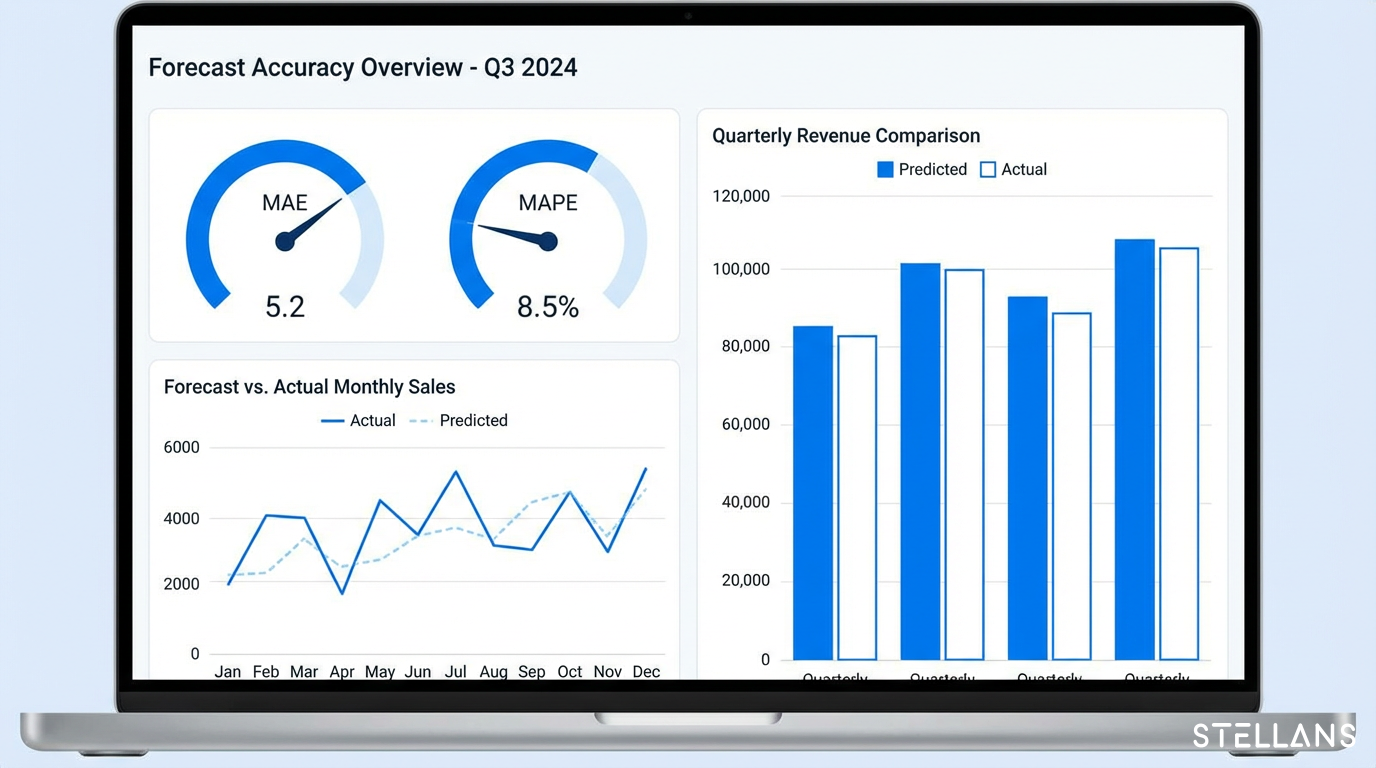
Evaluating Forecast Accuracy

Two metrics matter most for demand forecasting:

from sklearn.metrics import mean_absolute_error
import numpy as np

# Split data for evaluation (hold out last 30 days)
train = df[:-30]
test = df[-30:]

# Retrain on training data
eval_model = Prophet(seasonality_mode='multiplicative')
eval_model.fit(train)

# Predict on test period
test_forecast = eval_model.predict(test[['ds']])

# Calculate MAE
mae = mean_absolute_error(test['y'], test_forecast['yhat'])
print(f"Mean Absolute Error: {mae:.2f}")

# Calculate MAPE
mape = np.mean(np.abs((test['y'] - test_forecast['yhat']) / test['y'])) * 100
print(f"Mean Absolute Percentage Error: {mape:.2f}%")

Interpretation benchmark: A MAPE under 10% is typically considered strong for demand forecasting. Values between 10-20% are acceptable for most business applications. Above 20% suggests the model needs refinement or additional features.

Visualizing Forecast vs. Actual

Clear visualization helps stakeholders understand and trust your forecasts.

Creating Interactive Charts with Plotly

Prophet includes built-in Plotly support for interactive visualizations:

from prophet.plot import plot_plotly, plot_components_plotly

# Create interactive forecast plot
fig = plot_plotly(model, forecast)
fig.update_layout(
    title='Demand Forecast: 90-Day Outlook',
    xaxis_title='Date',
    yaxis_title='Demand (Units)'
)
fig.show()

# View seasonality components
fig_components = plot_components_plotly(model, forecast)
fig_components.show()

What to look for in the output:

The components plot breaks down your forecast into trend, weekly seasonality, and yearly seasonality, helping you explain the “why” behind predictions to business stakeholders.

Best Practices for Maintaining Your Macro Library

A well-maintained macro library saves time across every project:

For more context on building repeatable data workflows, explore how we implemented data-driven demand forecasting for clients facing similar challenges.

Scaling Forecasting with Stellans

These macros and Prophet workflows handle many forecasting needs. Some challenges require more:

When DIY approaches reach their limits, we help. Stellans offers managed forecasting pipelines, model deployment, and ongoing monitoring designed for organizations that need production-grade solutions without building everything from scratch.

Contact us for a free forecasting consultation to discuss your specific requirements.

Conclusion

Building a forecasting pipeline does not require a data science team. By combining dbt macros with Prophet, you create:

Your actionable next step: Start with 3-5 macros from this guide. Build them into your dbt project. Run a simple Prophet forecast on one metric. Iterate from there.

The combination of structured data preparation (dbt) and accessible forecasting (Prophet) puts predictive analytics within reach for teams that thought it required specialized expertise.

Ready to accelerate your analytics capabilities? Explore how Stellans can help.

Frequently Asked Questions

What are DBT macros used for?

DBT macros are reusable pieces of SQL and Jinja code that help analytics engineers standardize logic, reduce code duplication, and manage complex transformations efficiently across data models. They function like functions in programming languages. According to dbt’s official Jinja macro documentation, macros let you “abstract snippets of SQL into reusable components that can be called anywhere in your dbt project.

How do you create a DBT macro?

Create a dbt macro by defining it in a .sql file within your project’s macros directory. Use Jinja syntax: start with {% macro macro_name(arguments) %} and end with {% endmacro %}. Call the macro in models using {{ macro_name(arguments) }}. For example, a simple macro to convert cents to dollars would be defined once and called across all models that need that conversion.

How do DBT macros integrate with Prophet forecasting?

dbt macros prepare time series data in your SQL warehouse by handling date formatting, lag features, rolling averages, and null values. The macros export data in Prophet’s required format (ds and y columns). Python then pulls this prepared data directly from the warehouse to train and evaluate Prophet models. This separation keeps data preparation in SQL where it belongs, and keeps Python focused on the forecasting logic.

What metrics should I use to evaluate Prophet forecasts?

Use MAE (Mean Absolute Error) for interpretable average error magnitude and MAPE (Mean Absolute Percentage Error) for percentage-based accuracy. MAE tells you the average size of your errors in the same units as your forecast. MAPE expresses error as a percentage, making it easier to compare across different scales. A MAPE under 10% is typically considered strong for demand forecasting applications.

References

Article By:

https://stellans.io/wp-content/uploads/2026/01/leadership-1-1.png
David Ashirov

Co-founder & CTO

Related Posts

    Get a Free Data Audit

    * You can attach up to 3 files, each up to 3MB, in doc, docx, pdf, ppt, or pptx format.